
Description
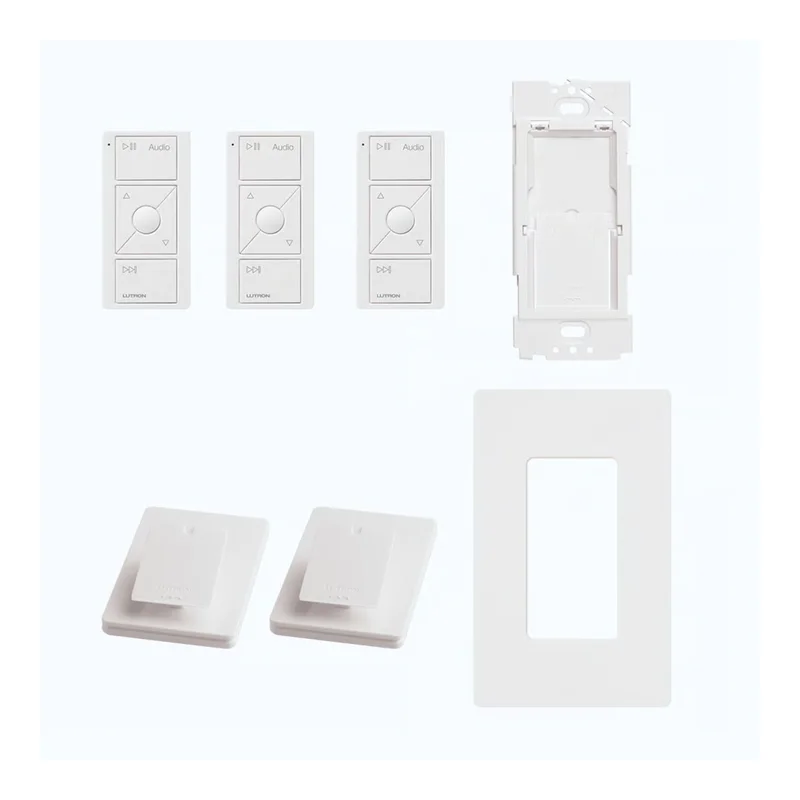
Lutron Caséta Audio Kit — Smart Hub PRO, 3 Pico Audio Remotes, Pedestals, Wallplate Bracket & Claro Wallplate
The Lutron P-BDGPRO-PKG3AW is a complete Caséta audio control starter kit designed for whole-home audio management. Control Sonos and other compatible audio systems from anywhere in your home — at the wall, on a tabletop, or from the Lutron app — using the included Pico Remote Controls for Audio. The Smart Hub PRO unlocks third-party pro-level integration, Apple HomeKit, and advanced smart home control.
What’s in the Kit
- Smart Hub PRO (L-BDGPRO2-WH): Allows third-party pro-level integration, control via the Lutron App, and integration with leading smart home brands. Operates at 120V~ / 5V⎓ 300mA (power supply included).
- 3× Pico Remote Controls for Audio (PJ2-3BRL-GWH-A02): Simple battery-powered keypads for direct audio control from anywhere in the home — no external power or communication wiring required. Each remote features Play/Pause, Volume Up/Down, Next Favorite Station, and Next Track buttons, plus an Indicator LED. 10-year battery life (one CR2032 battery included per remote). Compatible with Caséta Wireless, RadioRA 2, and HomeWorks QS systems. Works with Sonos and other select audio control systems.
- 2× Pedestals (L-PED1-WH): Allow the Pico remotes to be used as tabletop controls — ideal for nightstands, desks, and entertainment centers.
- Wallplate Bracket (PICO-WBX-ADAPT): Allows easy installation of a Pico remote over an existing wallbox or directly on any wall surface — no cutting holes or running wires required.
- Claro Wallplate (CW-1-WH): Provides a clean, finished look for the wall-mounted Pico remote.
Key Features
- Whole-Home Audio Control: Control Sonos and other compatible audio systems from anywhere in the home using the Pico Remote Controls for Audio.
- Pico Audio Remote Controls: Play/Pause, Volume Up/Down, Next Favorite Station, and Next Track — all from a simple, battery-powered keypad with no wiring required.
- 10-Year Battery Life: Each Pico Audio Remote operates on a single CR2032 battery with a 10-year typical battery life.
- Flexible Placement: Use the included pedestals for tabletop control or the wallplate bracket for wall-mounted control — or both.
- Smart Hub PRO: Enables third-party pro-level integration, Apple HomeKit with HomeKit Technology, and control via the Lutron App.
- Clear Connect RF Technology: Communicates at 431 MHz to 437 MHz. Thousands of system addresses prevent interference between systems.
- Wireless Range: Can be assigned to a Lutron Smart Bridge, Smart Bridge PRO, or Lutron Repeater within a 30 ft (9 m) range.
- Mounting Flexibility: Pico remotes can be used as handheld remotes, wall-mount controls (with or without faceplate), or tabletop controls using the included pedestals.
- Operating Temperature: 32°F to 140°F (0°C to 60°C). Indoor use only. Maximum 90% non-condensing relative humidity.
- Certifications: FCC Certified (USA), IC Certified (Canada), COFETEL Certified (Mexico), SUTEL Certified (Costa Rica), Anatel Certified (Brazil).
Pico Audio Remote — Button Functions
- Play/Pause: Press to begin playing audio track; press again to pause.
- Volume: Press to increase or decrease the volume.
- Next Favorite Station: Cycle through your pre-defined music stations.
- Next Track: Press to skip to the next audio track (some services may limit how often this feature can be used).
- Indicator LED: Flashes to indicate a button press or when the unit is in programming mode.
Mounting Considerations
Mounting RF devices on or in close proximity to a metal surface will drastically reduce the effective range of radio signal transmission and reception. All RF devices must be mounted on non-conductive materials to ensure proper performance. If mounting to a metal surface, the PICO-MOUNT-1-XX-CPN5733 is required — contact your local Lutron sales office for availability.
Setup
Connect the Smart Hub PRO to your router via ethernet cable using the included power supply. Use the Lutron app to pair the Pico Audio Remotes and assign them to your audio zones. Mount remotes using the included pedestals for tabletop use or the wallplate bracket for wall-mounted control.
Reviews
There are no reviews yet.